
What is JoelKallman Day?
Joel Kallman was a professional whose life was dedicated to databases and one of the co-creators of Oracle Application Express. With a career spanning several decades, he made significant contributions to database development and management. He passed away from COVID-19 on May 25, 2021.
Since 2016, there has been an Oracle Community Day where bloggers share content on the same day to create a sense of community buzz. The name of the event has changed over the years, but in 2021, it was renamed “Joel Kallman Day.” This year, it will be held on Wednesday, October 14th. The details of how it works are explained in Tim Hall’s blog post.
You may also refer to my old blog posts published in Joel Kallman Day:
- Removing old Oracle Grid and Database Homes #JoelKallmanDay
- A 3D data with a 2D SRID may result with ORA-13029 #JoelKallmanDay
- Ping Checks Life, tnsping Checks Purpose #JoelKallmanDay
Changing Db_unique_name:
In Oracle Database environments, changing the DB_UNIQUE_NAME parameter may be necessary after database cloning, environment refreshes, infrastructure migrations, or when you choose to use same db_unique_name after a dataguard switchover operation.
It is a straightforward operation and not a big deal actually.
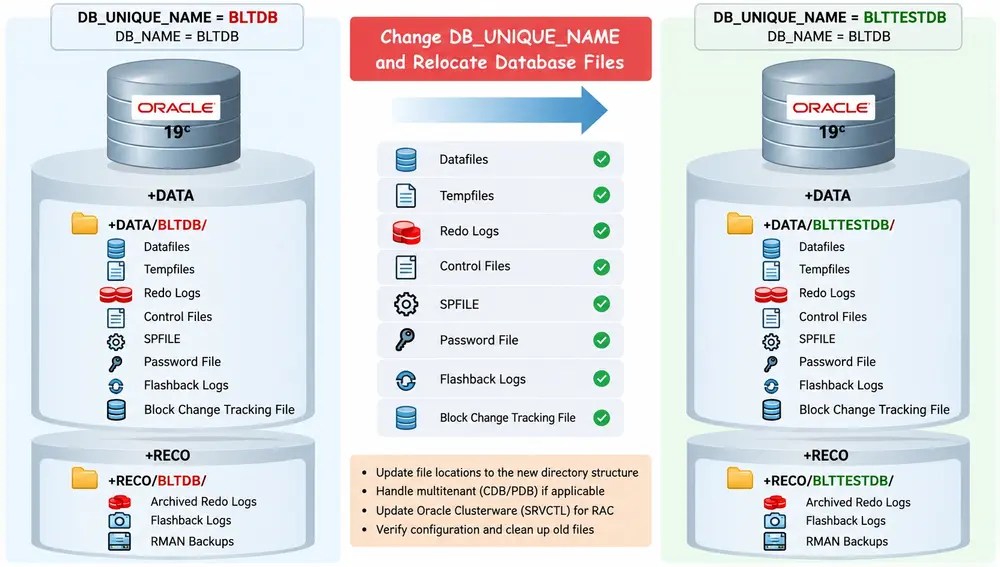
We want to change the database’s unique name from BLTDB to BLTTESTDB while keeping DB_NAME unchanged. We also want to relocate all database files from the original directory structure to the new one. Here is the starting point.
SQL> SHOW PARAMETER db_nameNAME VALUE---------- --------db_name BLTDBSQL> SHOW PARAMETER db_unique_nameNAME VALUE--------------- --------db_unique_name BLTDB
For ASM:
Old: +DATA/BLTDB/New: +DATA/BLTTESTDB/
For filesystem storage:
Old: /u02/oradata/PROD/New: /u02/oradata/TEST/
The main challenge is that changing DB_UNIQUE_NAME does not automatically relocate existing database files. The original file paths remain in the control file and other database configuration settings.
This post demonstrates how to change the database’s unique name and relocate its files, including the datafiles belonging to CDB$ROOT, PDB$SEED, and user-created pluggable databases.
Understanding DB_NAME and DB_UNIQUE_NAME
Before proceeding, it is important to understand the difference between these parameters.
| Parameter | Description |
| DB_NAME | Database name recorded in the control file. |
| DB_UNIQUE_NAME | Unique identifier for the database, especially important for Data Guard and datafilre locations |
| INSTANCE_NAME | Identifies an Oracle instance – db located in memory |
| SERVICE_NAMES | Database service naming configuration where database provides the service |
| DB_CREATE_FILE_DEST | Default location for Oracle Managed Files (OMF). |
We are not changing the database’s DB_NAME or DBID. Therefore, the DBNEWID (nid) utility is not required. Changing DB_NAME is a different operation and is outside the scope of this article.
Check the current initialization parameters for the parameters provided below, they will play role in our operations.
SHOW PARAMETER db_nameSHOW PARAMETER db_unique_nameSHOW PARAMETER db_create_file_destSHOW PARAMETER db_recovery_file_destSHOW PARAMETER control_filesSHOW PARAMETER spfile
List all the pluggable databases.
SELECT con_id, name, open_modeFROM v$pdbsORDER BY con_id;CON_ID NAME OPEN_MODE------ --------- ----------1 CDB$ROOT READ WRITE2 PDB$SEED READ ONLY3 APPPDB READ WRITE
Check all datafiles (undo also), including PDB$SEED
I will query the CDB_DATA_FILES views to show the name and location of each data file for all of the PDBs in a CDB, including the PDB seed. PDB$SEED container id is 2.
Sample output:
SQL> SELECT CON_ID, FILE#, FILE_NAME FROM V$DATAFILE;CON_ID FILE# FILE_NAME------ ----- -----------------------------------------------1 1 +DATA/BLTDB/DATAFILE/system.257.1234567891 3 +DATA/BLTDB/DATAFILE/sysaux.258.1234567891 130 +DATA/BLTDB/DATAFILE/undotbs1.259.1234567891 7 +DATA/BLTDB/DATAFILE/users.289.123456789...2 5 +DATA/BLTDB/A8DA5D32F8F5590DE053C4E15A0A6EED/DATAFILE/system.260.1234567892 6 +DATA/BLTDB/A8DA5D32F8F5590DE053C4E15A0A6EED/DATAFILE/sysaux.261.123456789...3 9 +DATA/BLTDB/A8DA63CEAD385A5BE053C4E15A0A774A/DATAFILE/system.262.123456789...
Notice that PDB$SEED has its own datafiles. These files must be included in a complete database relocation. Querying only DBA_DATA_FILES from CDB$ROOT is not sufficient for listing all PDB datafiles. You may also use CONTAINERS function for same purpose.
The CONTAINERS function :
The CONTAINERS() function in Oracle Database is used in a multitenant architecture to retrieve data from a specified table or view across multiple containers (the cdb$root and its PDBs). It combines the results from each container into a single result set, making it easier to query information across the entire database without connecting to each PDB individually. For example, CONTAINERS(“SYS”.”DBA_DATA_FILES”)retrieves data file information from the DBA_DATA_FILES view across containers.The result includes a CON_ID column, which identifies the container where each row originates. You may refer to Tim Hall’s post “Multitenant : PDB CONTAINERS Clause in Oracle Database 12c (12.1.0.2 and 12.2)” for more information.
Check temporary files including PDB$SEED
I will query the CDB_TEMP_FILES views to show the name and location of each temporary file for all of the PDBs in a CDB, including the PDB seed.
SQL> SELECT CON_ID, FILE#, NAME
  FROM V$TEMPFILE;
  ORDER BY CON_ID;

 CON_ID FILE_ID  FILE_NAME
------ ------- ----------------------------------------------
     1       9  +DATA/BLTDB/TEMPFILE/temp.269.782738817
     2       10 +DATA/BLTDB/A8DA5D32F8F5590DE053C4E15A0A6EED/TEMPFILE/temp.279.782738817
     3       8  +DATA/BLTDB/A8DA63CEAD385A5BE053C4E15A0A774A/TEMPFILE/temp.295.782738817
Check redolog files (online and standby)
I will query the v$logfile view to show the name and location of logfiles.
SELECT group#, type, memberFROM v$logfileORDER BY group#, member;
Check control files:
We may query v$controlfile or look parameter value of control_files.
show parameter control_files
Also check for Data Guard configuration (dataguard broker config files), Flashback Database (flashback logs) and block change tracking file locations before planning the relocation. Dataguard broker config files can be recreated. Flashback can be reenabled and block change tracking also can be disabled and reenabled.
Preparation and Backup:
The following operations can affect the availability and recoverability of the database. Schedule a maintenance window (especially for control files location change) and take a validated backup before making changes.
rman target /BACKUP DATABASE PLUS ARCHIVELOG;BACKUP CURRENT CONTROLFILE;BACKUP SPFILE;
Save the current SPFILE parameters to a pfile also.
CREATE PFILE='/tmp/initBLTDB_before_change.ora' FROM SPFILE;
Also record current clusterware configuration.
srvctl config database -db BLTDBsrvctl status database -db BLTDB
For a RAC environment, record the instance-to-node mapping, services, disk group dependencies, and the registered SPFILE and password file locations.
Important: The detailed execution steps provided below assume a standalone Oracle 19c CDB, no active Data Guard configuration, and an available maintenance window. RAC and Data Guard may require additional coordinated steps (dataguard related parameter should be configured according to the new db_unique_name). In particular, do not treat the standalone shutdown/startup sequence as a complete RAC procedure. But not much different.
Change DB_UNIQUE_NAME:
The DB_UNIQUE_NAME parameter is static and requires a database restart. (RAC or standalone does not matter – requires a restart)
ALTER SYSTEM SET db_unique_name='BLTTESTDB' SCOPE=SPFILE;SHUTDOWN IMMEDIATE;STARTUP;SELECT name, db_unique_nameFROM v$database;NAME DB_UNIQUE_NAME------- --------------BLTDB BLTTESTDB
This changes the database parameter but does not move any files.
Configure DB_CREATE_FILE_DEST (default data file location) and DB_RECOVERY_FILE_DEST (Fast recovery area) as simply just showing the ASM disk groups.
ALTER SYSTEM SET db_create_file_dest='+DATA' SCOPE=BOTH;ALTER SYSTEM SET db_recovery_file_dest='+RECO' SCOPE=BOTH;
Relocate all datafiles (except undo datafile):
There are two practical approaches.
- ALTER DATABASE MOVE DATAFILE, which supports online datafile movement after 12c. (for system tablespace 19c).
- RMAN imagecopy, restore and switch operations.
Move all datafiles online (except undo) in cdb$root:
For filesystem storage:
ALTER DATABASE MOVE DATAFILE '/u02/oradata/BLTDB/system01.dbf'TO '/u02/oradata/BLTTESTDB/system01.dbf';
For ASM, make sure db_create_file_dest is correct and moving the datafile will take care of the rest.
ALTER DATABASE MOVE DATAFILE '+DATA/BLTDB/DATAFILE/users.266.123456789'TO '+DATA';
When Oracle Managed Files (OMF) is configured, there is no need to specify either the source or destination file location. The following command moves datafile 6 to the default OMF destination defined by the DB_CREATE_FILE_DEST parameter, automatically generating a new filename. Oracle handles the file relocation and updates the control file with the new location while keeping the datafile online.
ALTER DATABASE MOVE DATAFILE 7;
The final filename should be verified after the move. After you will see datafile is created on the desired destination.
+DATA/BLTTESTDB/DATAFILE/users.266.123456789
This technique is convenient for moving individual datafiles, but it is not a complete solution for every database file type.
Move all datafiles online (except undo) in pluggable databases:
Actually commands are no different than container, you just need to switch to the PDB container. Otherwise you will get the error provided below:
*ERROR at line 1:ORA-01516: nonexistent log file, data file, or temporary file "6"
ALTER SESSION SET CONTAINER=APPPDB;ALTER DATABASE MOVE DATAFILE 9; -- after move operation completed it will be on the desired location.-- +DATA/BLTTESTDB/A8DA63CEAD385A5BE053C4E15A0A774A/DATAFILE/system.262.123456789
Move all datafiles online (except undo) in pdb$seed :
PDB$SEED deserves special attention because it is a system-maintained, read-only pluggable database used as the template for creating new PDBs. pdb$seed pluggable database is read-only by default and it is normal.
But there is a hidden parameter which gives us the ability to open it in read-write mode.
_ORACLE_SCRIPT is an undocumented Oracle underscore parameter (_ORACLE_SCRIPT) used internally by Oracle scripts and installation tools to bypass standard multitenant limitations,it allow modifications or operations inside PDB$SEED database.
ALTER SESSION SET "_ORACLE_SCRIPT"=TRUE;ALTER PLUGGABLE DATABASE PDB$SEED CLOSE;ALTER PLUGGABLE DATABASE PDB$SEED OPEN READ WRITE;ALTER SESSION SET CONTAINER=PDB$SEED;ALTER DATABASE MOVE DATAFILE 5; ALTER DATABASE MOVE DATAFILE 6;ALTER PLUGGABLE DATABASE PDB$SEED CLOSE;ALTER PLUGGABLE DATABASE PDB$SEED OPEN READ ONLY;
Relocating / Creating new undo datafiles:
To relocate datafiles belonging to an UNDO tablespace to a new DB_UNIQUE_NAME directory, you need to create a new UNDO tablespace rather than move the existing UNDO datafiles. Set the new UNDO tablespace as the default and drop the old one once it is no longer in use. It may take some time depending your database workload, also you may bounce the database to make sure that old undo tablespace no longer used.
CREATE UNDO TABLESPACE UNDOTBS_NEWDATAFILE SIZE 10GAUTOEXTEND ON NEXT 1G MAXSIZE 32G;ALTER SYSTEM SET UNDO_TABLESPACE = UNDOTBS_NEW;SHOW PARAMETER undo_tablespace;DROP TABLESPACE UNDOTBSINCLUDING CONTENTS AND DATAFILES;
Important for RAC: Each RAC instance normally uses its own UNDO tablespace. Therefore, create and assign a NEW UNDO tablespace for each instance separately. Do not drop an old UNDO tablespace while any instance is still using it.
Also, if LOCAL_UNDO_ENABLED is set to TRUE, each pluggable database (PDB) has its own UNDO tablespace. Therefore, you need to switch to each PDB and perform the same operation by executing the corresponding commands separately in each PDB.
Relocating / Creating new undo datafiles for PDB$SEED:
Additionally, for PDB$SEED, you need to use the same hidden parameter, _ORACLE_SCRIPT. The required commands are shown below.
ALTER SESSION SET "_ORACLE_SCRIPT"=TRUE;ALTER PLUGGABLE DATABASE PDB$SEED CLOSE;ALTER PLUGGABLE DATABASE PDB$SEED OPEN READ WRITE;ALTER SESSION SET CONTAINER=PDB$SEED;CREATE UNDO TABLESPACE UNDOTBS_NEWDATAFILE SIZE 10GAUTOEXTEND ON NEXT 1G MAXSIZE 32G;ALTER SYSTEM SET UNDO_TABLESPACE = UNDOTBS_NEW;SHOW PARAMETER undo_tablespace;DROP TABLESPACE UNDOTBSINCLUDING CONTENTS AND DATAFILES;ALTER PLUGGABLE DATABASE PDB$SEED CLOSE;ALTER PLUGGABLE DATABASE PDB$SEED OPEN READ ONLY;
Relocating Temporary Tablespace – Tempfiles:
To relocate tempfiles to the new DB_UNIQUE_NAME directory, add appropriately sized replacement tempfiles to the existing temporary tablespace at the desired location. Once the new tempfiles are available, drop the old tempfiles after ensuring they are no longer in use after a period of time. There is no need to recreate the temporary tablespace itself.
ALTER TABLESPACE TEMPADD TEMPFILE SIZE 10GAUTOEXTEND ON NEXT 1G MAXSIZE 30G;-- Oracle automatically generates the tempfile name and places it in the OMF destination (db_create_file_dest)-- +DATA/BLTTESTDB/TEMPFILE/temp.269.782738817ALTER DATABASE TEMPFILE'+DATA/BLTDB/TEMPFILE/temp.269.782738817'DROP INCLUDING DATAFILES;-- If an active database session is currently using the tempfile for sorting or hashing, -- the command will fail with ORA-25152: TEMPFILE cannot be dropped at this time
If an active database session is currently using the tempfile for sorting or hashing, the drop command will fail with ORA-25152: TEMPFILE cannot be dropped at this time. You may run it a later time.
Relocating Tempfiles for PDB$SEED:
Again, for PDB$SEED, you need to use the same hidden parameter, _ORACLE_SCRIPT. The required commands are shown below.
ALTER SESSION SET "_ORACLE_SCRIPT"=TRUE;ALTER PLUGGABLE DATABASE PDB$SEED CLOSE;ALTER PLUGGABLE DATABASE PDB$SEED OPEN READ WRITE;ALTER SESSION SET CONTAINER=PDB$SEED;ALTER TABLESPACE TEMPADD TEMPFILE SIZE 10GAUTOEXTEND ON NEXT 1G MAXSIZE 30G;--Oracle automatically generates the tempfile name and places it in the OMF destination (db_create_file_dest)ALTER DATABASE TEMPFILE'+DATA/BLTDB/A8DA5D32F8F5590DE053C4E15A0A6EED/TEMPFILE/temp.279.782738817'DROP INCLUDING DATAFILES;ALTER PLUGGABLE DATABASE PDB$SEED CLOSE;ALTER PLUGGABLE DATABASE PDB$SEED OPEN READ ONLY;
Relocating / Creating Redolog Files:
The preferred approach for a relocation of redolog files is to add new redo log groups in the destination and then drop the old inactive redolog groups after ensuring they are no longer active.
Make sure DB_CREATE_ONLINE_LOG_DEST_1 and DB_CREATE_ONLINE_LOG_DEST_2 are configured, you can omit the filenames and let Oracle create the redo log members automatically as Oracle Managed Files on these two locations.
ALTER SYSTEM SET db_create_online_log_dest_1='+DATA' SCOPE=BOTH;ALTER SYSTEM SET db_create_online_log_dest_2='+RECO' SCOPE=BOTH;
ALTER DATABASE ADD LOGFILE GROUP 4 SIZE 4G;
Oracle automatically creates two redo log members, one in each configured destination. Oracle generates filenames similar to:
+DATA/BLTTESTDB/ONLINELOG/group_4.300.123456789+RECO/BLTTESTDB/ONLINELOG/group_4.301.123456790
For RAC, specify the redo thread when creating new redolog groups:
ALTER DATABASE ADD LOGFILE THREAD 1 GROUP 4 SIZE 4G;ALTER DATABASE ADD LOGFILE THREAD 2 GROUP 5 SIZE 4G;
After creating the new redo log groups using OMF, you can check the status of the existing groups and drop them once they become INACTIVE.
SELECT thread#, group#, sequence#, status, archived, bytes / 1024 / 1024 AS size_mbFROM v$logORDER BY thread#, group#;
| Status | Description | Can Be Dropped? |
| CURRENT | Currently being written to | No |
| ACTIVE | Required for instance recovery | No |
| INACTIVE | No longer required for instance recovery | Yes |
| UNUSED | Never written | Yes |
If the old groups are still CURRENT or ACTIVE, perform log switches and a checkpoint.
ALTER SYSTEM SWITCH LOGFILE;ALTER SYSTEM CHECKPOINT;--For RAC, you can force a log switch across all enabled threads:ALTER SYSTEM ARCHIVE LOG CURRENT;
Repeat log switching as necessary until the old groups are INACTIVE. Once the old groups are eligible for removal, drop them.
All remaining redo log members are now located under the new DB_UNIQUE_NAME directory structure. These steps can also be applied to Standby redo log groups . V$STANDBY_LOG must be checked , they can be dropped without a switch operation since they will not be in use in primary database.
Relocating – Changing Control File Locations:
Control files require a different procedure because they must be available when the database mounts. In this example, I will relocate the control files to the new DB_UNIQUE_NAME directory in the +DATA and +RECO ASM disk groups using RMAN.
First, identify the current control file locations.
I will temporarily configure database to use a filesystem copy of the control file.
ALTER SYSTEM SET control_files='/tmp/current.256.1173365052' SCOPE=SPFILE;
Since CONTROL_FILES is a static parameter, the change will take effect after restarting the instance. Shut down the database and copy the control file.
SHUTDOWN IMMEDIATE;
Copy the existing control file from ASM to the filesystem:
asmcmd> cp +DATA/BLTDB/CONTROLFILE/current.256.1173365052 /tmp/current.256.1173365052
Verify that the file was copied successfully. Start the database in NOMOUNT mode.
SHUTDOWN IMMEDIATE;
The instance starts without mounting the database, which we can use RMAN to restore the control files to the desired ASM destination. Start an RMAN session:
rman target /
Restore the control file to both ASM disk groups:
RESTORE CONTROLFILE TO '+DATA'FROM '/tmp/current.256.1173365052';RESTORE CONTROLFILE TO '+RECO'FROM '/tmp/current.256.1173365052'
Oracle will generate OMF filenames in the destination ASM disk groups. Using ASMCMD, verify the new control file locations:
+DATA/BLTTESTDB/CONTROLFILE/current.316.1193365052+RECO/BLTTESTDB/CONTROLFILE/current.346.1173456743
Update the SPFILE with the actual filenames generated by RMAN.
ALTER SYSTEM SET control_files='+DATA/BLTTESTDB/CONTROLFILE/current.316.1193365052','+RECO/BLTTESTDB/CONTROLFILE/current.346.1173456743'SCOPE=SPFILE
Because the instance is currently in NOMOUNT mode, shut it down and start it normally.
SHUTDOWN IMMEDIATE;STARTUP;
Once the database opens successfully and both control files are verified, the relocation operation of control files is complete.
Relocating – Changing SPFile Locations:
After relocating the datafiles, tempfiles, redo logs, and control files, the next step is to relocate the SPFILE to the new DB_UNIQUE_NAME directory and update the Oracle Clusterware configuration accordingly.
In this example, I will use:
Old DB_UNIQUE_NAME : BLTDBNew DB_UNIQUE_NAME : BLTTESTDBASM Disk Group : +DATAOld SPFILE : +DATA/BLTDB/PARAMETERFILE/...New SPFILE : +DATA/BLTTESTDB/PARAMETERFILE/...
First I will create the PARAMETERFILE directory in asmcmd.
asmcmd> mkdir +DATA/BLTTESTDB/PARAMETERFILE
Now il will create a pfile first and create the spfile from it.
CREATE PFILE='/tmp/initBLTTESTDB.ora' FROM SPFILE;CREATE SPFILE='+DATA/BLTTESTDB/PARAMETERFILE/spfileBLTTESTDB.ora'FROM PFILE='/tmp/initBLTTESTDB.ora';
After a restart, database will start with new spfile. Creating a new SPFILE does not automatically make Oracle or Clusterware use it. The database’s startup configuration must be updated, I will do it on the final step.
Relocating – Changing the password file location:
First, obtain the existing password file location from clusterware with srvctl config database. Example:
+DATA/BLTDB/PASSWORD/pwdbltdb.275.1173365052
Create a destination directory in asm.
asmcmd> mkdir +DATA/BLTTESTDB/PASSWORD
Copy the existing password file to the new location, -f flag Forces a deletion of the existing password file and creates a new password file.
asmcmd> pwcopy -f +DATA/BLTDB/PASSWORD/pwdbltdb.275.1173365052 +DATA/BLTTESTDB/PASSWORD/pwdblttestdb --dbuniquename LBSGLSBSM -
Now password file location change is also complete.
Update the Clusterware database information
Actually, changing db_unique_name does not simply update clusterware database information.
Capture current clusterware information.
srvctl config database -db BLTDB srvctl config service -db BLTDBsrvctl config instance -db BLTDB
Remove the old database registration with srvctl remove service, srvctl remove database and re-register to clusterware with the new values.
srvctl stop service -db BLTDB -service APP_SVCsrvctl stop database -db BLTDBsrvctl remove service -db BLTDB -service APP_SVCsrvctl remove instance -db BLTDB -instance BLTDB1srvctl remove instance -db BLTDB -instance BLTDB2srvctl remove database -db BLTDBsrvctl add database \ -db BLTTESTDB \ -dbname BLTDB \ -oraclehome /u01/app/oracle/product/19.0.0/dbhome_1 \ -spfile +DATA/BLTTESTDB/PARAMETERFILE/spfileBLTTESTDB.ora \ -pwfile +DATA/BLTTESTDB/PASSWORD/pwdblttestdb \ -diskgroup "DATA,RECO" -dbtype RAC srvctl add instance \ -db BLTTESTDB \ -instance BLTDB1 \ -node node1 srvctl add instance \ -db BLTTESTDB \ -instance BLTDB2 \ -node node2 srvctl add service \ -db BLTTESTDB \ -service APP_SVC \ -preferred BLTDB1,BLTDB2 srvctl start database -db BLTDB
(Optional) Changing the flashback logfiles location:
If Flashback Database is enabled, you may also want to create flashback logs in the new DB_UNIQUE_NAME directory.
Flashback logs cannot be moved he simplest approach is to disable and re-enable Flashback Database after configuring the new FRA destination.
First, check whether Flashback Database is enabled:
SELECT flashback_on FROM v$database;
If enabled, disable it. Then re-enable Flashback Database:
ALTER DATABASE FLASHBACK OFF;ALTER DATABASE FLASHBACK ON;
Disabling Flashback Database removes the existing flashback log history, so previous flashback restore points in time will no longer be available. Check for guaranteed restore points before proceeding, as they may prevent Flashback Database from being disabled. This operation should only be performed when losing the existing flashback history is acceptable.
(Optional) Changing the Block Change Tracking File Location
If Block Change Tracking (BCT) is enabled, you may also want to relocate its file to the new DB_UNIQUE_NAME directory.
The simplest approach is to disable and re-enable Block Change Tracking like Flashback log files after configuring the new destination. Oracle will automatically create a new Block Change Tracking file using Oracle Managed Files (OMF) if DB_CREATE_FILE_DEST is configured.
First, check whether Block Change Tracking is enabled and identify the current file location:
SELECT status, filenameFROM v$block_change_tracking;
If enabled, disable Block Change Tracking. Re-enable Block Change Tracking without specifying a filename.
ALTER DATABASE DISABLE BLOCK CHANGE TRACKING;ALTER DATABASE ENABLE BLOCK CHANGE TRACKING;
Oracle automatically creates a new Block Change Tracking file in the configured OMF destination, using the current DB_UNIQUE_NAME directory structure.
SELECT status, filenameFROM v$block_change_tracking;STATUS FILENAME--------- ------------------------------------------------------ENABLED +DATA/BLTTESTDB/CHANGETRACKING/ctf.345.1193365052
Disabling Block Change Tracking resets the existing change tracking information. After re-enabling it, RMAN incremental backups may need to scan all data blocks until sufficient new tracking information has accumulated. This can increase incremental backup duration until a full incremental level 0 backup is taken.
Conclusion
Changing DB_UNIQUE_NAME does not automatically relocate existing database files to the new directory structure. Each database file type requires a different approach, including datafiles, tempfiles, redo logs, control files, SPFILE, password file, flashback logs, and block change tracking files.
In a multitenant environment, special attention should be given to PDB$SEED and user-created PDBs. For RAC databases, the Oracle Clusterware configuration must also be updated to reflect the new DB_UNIQUE_NAME.
Finally, verify all file locations and database configurations before removing the old directories to ensure a complete and successful migration.
This has been an extremely long post.
Hope it helps.


Leave your comment