

It is possible to deploy an Autonomous Database on your laptop with a management interface like OCI?
Yes, it is possible. Oracle Autonomous Database can be deployed locally using container systems such as Kubernetes or Podman, with some limitations.
Oracle Autonomous Database on OCI offers a serverless cloud service with three types of workloads:
- ATP (Autonomous Transaction Processing – OLTP)
- ADW (Autonomous Data Warehouse – OLAP)
- AJD (Autonomous JSON Database)
For testing and training purposes, Oracle provides free container images that support two types of database workloads: ADW and ATP each limited to 20 GB storage. These images not only allow you to run the databases in containers but also include the following key features:
- Oracle REST Data Services (ORDS)
- Oracle APEX
- Database Actions
- Mongo API
- Oracle Estate Explorer (OEE)
Although these images have been available since September 2023, I only became aware of them through Virtual Classroom #22: Migration to Oracle Autonomous Database – Part 1: Planning.
What’s great about this is that it not only provides an Autonomous Database similar to OCI ADB Serverless offerings, but also includes a similar web interface through ORDS (Oracle REST Data Services, also known as the REST API layer).
Actually, all the information is available in the Oracle Autonomous Database Free Container Image documentation on the official GitHub page of adb-free. The documentation is simple to follow, and the setup process is straightforward for both Windows and Linux environments.
Prepare Docker Environment for ARM-based Apple MacBook computer
Currently, there is no available image for ARM-based systems, but it is possible to run it using Apple’s new virtualization framework (Rosetta) on macOS and I will show how. Rosetta is a binary translation framework developed by Apple that allows applications built for Intel-based Macs (x86_64 architecture) to run on Apple Silicon Macs (ARM architecture). Rosetta 2 translates Intel-based code into ARM-based code at runtime, so apps that haven’t been recompiled for Apple Silicon can still run smoothly on newer Macs (like those with M1, M2, or M3 chips).
We will install colima and docker to emulate x86_64 architecture.
osmandinc@192 ~ % brew install dockerosmandinc@192 ~ % brew install docker-composeosmandinc@192 ~ % brew install colimaosmandinc@192 ~ % brew install lima-additional-guestagentsosmandinc@192 ~ % brew reinstall qemu
Also I will install Rosetta 2.
osmandinc@192 ~ % softwareupdate --install-rosetta --agree-to-licenseInstall of Rosetta 2 finished successfully
Oracle Autonomous Database Free container requires 4 CPUs and 8 GB memory. Running x86_64 arch containers can have issues translating instructions for ARM. We give higher memory to the VM to avoid such issues and used commands provided below.
osmandinc@192 ~ % colima stopINFO[0000] stopping colimaINFO[0000] not running context=vmINFO[0000] doneosmandinc@192 ~ % colima deleteare you sure you want to delete colima and all settings? [y/N] Ythis will delete ALL container data. Are you sure you want to continue? [y/N] YINFO[0007] deleting colimaINFO[0007] doneosmandinc@192 ~ % colima start --cpu 4 --memory 10 --arch x86_64 --vm-type vz --vz-rosettaINFO[0000] starting colimaINFO[0000] runtime: dockerINFO[0002] creating and starting ... context=vmINFO[0055] provisioning ... context=dockerINFO[0062] starting ... context=dockerINFO[0068] done
Verify the colima architecture whether it is running with x86_64 architecture.
osmandinc@192 ~ % colima statusINFO[0000] colima is running using macOS Virtualization.FrameworkINFO[0000] arch: x86_64INFO[0000] runtime: dockerINFO[0000] mountType: virtiofsINFO[0000] socket: unix:///Users/osmandinc/.colima/default/docker.sock
Create an Oracle Autonomous Database on your laptop
Now I will download and start Oracle Database 23ai Autonomous Database docker. For Database version 19c, you should use the ghcr.io/oracle/adb-free:latest image.
ADMIN_PASSWORD must be between 12 and 30 characters long and must include at least one uppercase letter, one lowercase letter, and one numeric character. WALLET_PASSWORD must be between 8 and 30 characters long and include alphabetic characters combined with numeric characters or special characters.
osmandinc@192 ~ % docker run -d \-p 1521:1522 \-p 1522:1522 \-p 8443:8443 \-p 27017:27017 \-e WORKLOAD_TYPE=ATP \-e WALLET_PASSWORD=Welcome123456 \-e ADMIN_PASSWORD=Welcome123456 \-e ENABLE_ARCHIVE_LOG=false \--cap-add SYS_ADMIN \--device /dev/fuse \--name adb-free \ghcr.io/oracle/adb-free:latest-23aiUnable to find image 'ghcr.io/oracle/adb-free:latest-23ai' locallylatest-23ai: Pulling from oracle/adb-free713de68234b9: Pull completeb01805961ae6: Pull complete1bc56ddcd3ab: Pull completeDigest: sha256:32aae6d71e16e2fa74a074861f6464d3884d58cce5d31ceeafd8fde61287b027Status: Downloaded newer image for ghcr.io/oracle/adb-free:latest-23ai3b05c1046ad74f3ba09e4e625675af2764699903d570a851d47f990c20147a7e
I disabled archive logging (default is enabled) because this environment is for testing and learning, and I want to avoid generating unnecessary archive logs that would increase container size.
Monitoring the creation process:
osmandinc@192 ~ % docker logs -f adb-freeArchive: /u01/POD1.zip creating: /u01/app/oracle/oradata/ creating: /u01/app/oracle/oradata/POD1/ inflating: /u01/app/oracle/oradata/POD1/redo01.log creating: /u01/app/oracle/oradata/POD1/3673F9E565C374E2E063153F466437DB/ creating: /u01/app/oracle/oradata/POD1/3673F9E565C374E2E063153F466437DB/datafile/ inflating: /u01/app/oracle/oradata/POD1/redo02.log creating: /u01/app/oracle/oradata/POD1/datafile/ inflating: /u01/app/oracle/oradata/POD1/datafile/o1_mf_undotbs1_n3q7w4q0_.dbf inflating: /u01/app/oracle/oradata/POD1/datafile/o1_mf_temp_n3q7w5kw_.tmp inflating: /u01/app/oracle/oradata/POD1/datafile/o1_mf_data_n3q7b02z_.dbf inflating: /u01/app/oracle/oradata/POD1/datafile/o1_mf_system_n3q6g6wp_.dbf inflating: /u01/app/oracle/oradata/POD1/datafile/o1_mf_sysaux_n3q6kz63_.dbf creating: /u01/app/oracle/oradata/POD1/3678B8A2AD715620E0636402000A99CE/ creating: /u01/app/oracle/oradata/POD1/3678B8A2AD715620E0636402000A99CE/datafile/ creating: /u01/app/oracle/oradata/POD1/onlinelog/ creating: /u01/app/oracle/oradata/POD1/3678AC6C36FC5237E0636402000A71CF/ creating: /u01/app/oracle/oradata/POD1/3678AC6C36FC5237E0636402000A71CF/datafile/ creating: /u01/app/oracle/oradata/POD1/3678BB80C63D566DE0636402000A0357/ creating: /u01/app/oracle/oradata/POD1/3678BB80C63D566DE0636402000A0357/datafile/ creating: /u01/app/oracle/oradata/POD1/3675103F3B34E40DE063153F4664C3A4/ creating: /u01/app/oracle/oradata/POD1/3675103F3B34E40DE063153F4664C3A4/datafile/ creating: /u01/app/oracle/oradata/POD1/controlfile/ inflating: /u01/app/oracle/oradata/POD1/controlfile/o1_mf_n3q6tzfp_.ctlTIME ELAPSED Unzipping /u01/POD1.zip: 1 minutes and 27 seconds elapsedUser input JSON not foundMY ADB WORKLOAD_TYPE is ATPMY ADB CUSTOM NAME is MYATPBUILDER: Configuring TCPSBUILDER: Cleanup /u01/app/oracle/wallets/tls_walletBUILDER: Creating auto login wallet for serverOracle PKI Tool Release 23.0.0.0.0 - ProductionVersion 23.0.0.0.0Copyright (c) 2004, 2025, Oracle and/or its affiliates. All rights reserved.Enter password:Enter password again:Operation is successfully completed.BUILDER: Creating a self-signed certificate using orapki utility; VALIDITY: 10 yearsOracle PKI Tool Release 23.0.0.0.0 - ProductionVersion 23.0.0.0.0Copyright (c) 2004, 2025, Oracle and/or its affiliates. All rights reserved.Cannot modify auto-login (sso) walletEnter wallet password:Operation is successfully completed.BUILDER: exporting server's certOracle PKI Tool Release 23.0.0.0.0 - ProductionVersion 23.0.0.0.0Copyright (c) 2004, 2025, Oracle and/or its affiliates. All rights reserved.Operation is successfully completed.BUILDER: exporting server's certOracle PKI Tool Release 23.0.0.0.0 - ProductionVersion 23.0.0.0.0Copyright (c) 2004, 2025, Oracle and/or its affiliates. All rights reserved.Operation is successfully completed.BUILDER: exporting encrypted private keyOracle PKI Tool Release 23.0.0.0.0 - ProductionVersion 23.0.0.0.0Copyright (c) 2004, 2025, Oracle and/or its affiliates. All rights reserved.Private key password:Enter password:Enter password again:Enter wallet password:Operation is successfully completed.BUILDER: exporting private and certificates together in PEMBUILDER: generating keystore.jks and truststore.jksOracle PKI Tool Release 23.0.0.0.0 - ProductionVersion 23.0.0.0.0Copyright (c) 2004, 2025, Oracle and/or its affiliates. All rights reserved.Enter wallet password:Enter Key store password:Enter Trust store password:Operation is successfully completed.BUILDER: generating sqlnet.ora for clientBUILDER: Generating tnsnames.ora based on the new CNBUILDER: Overriding service names based on user inputBUILDER: generating ojdbc.propertiesTIME ELAPSED Wallet Generation: 1 minutes and 11 seconds elapsedUser has requested to download '.pdb' archive file from Object Storage bucketDownloading MY_ATP.pdb..100%|██████████| 401M/401M [00:43<00:00, 9.59MB/s]Download complete for MYATP.pdbPDB archive file saved at: /u01/data/MYATP.pdbTIME ELAPSED Downloaded PDBs: 0 minutes and 47 seconds elapsedLSNRCTL for Linux: Version 23.0.0.0.0 - for Oracle Cloud and Engineered Systems on 16-JUN-2025 14:29:04Copyright (c) 1991, 2025, Oracle. All rights reserved.Starting /u01/app/oracle/product/23.0.0.0/dbhome_1/bin/tnslsnr: please wait...TNSLSNR for Linux: Version 23.0.0.0.0 - for Oracle Cloud and Engineered SystemsSystem parameter file is /u01/app/oracle/product/23.0.0.0/dbhome_1/network/admin/listener.oraLog messages written to /u01/app/oracle/diag/tnslsnr/c2732d9a8d1d/listener/alert/log.xmlListening on: (DESCRIPTION=(ADDRESS=(PROTOCOL=tcp)(HOST=0.0.0.0)(PORT=1521)(FIREWALL=OFF)))Listening on: (DESCRIPTION=(ADDRESS=(PROTOCOL=tcps)(HOST=0.0.0.0)(PORT=1522)(FIREWALL=OFF)))Listening on: (DESCRIPTION=(ADDRESS=(PROTOCOL=ipc)(KEY=EXTPROC1521)))Connecting to (DESCRIPTION=(ADDRESS=(PROTOCOL=TCP)(HOST=0.0.0.0)(PORT=1521)(FIREWALL=OFF)))STATUS of the LISTENER------------------------Alias LISTENERVersion TNSLSNR for Linux: Version 23.0.0.0.0 - for Oracle Cloud and Engineered SystemsStart Date 16-JUN-2025 14:29:05Uptime 0 days 0 hr. 0 min. 0 secTrace Level offSecurity ON: Local OS AuthenticationSNMP OFFListener Parameter File /u01/app/oracle/product/23.0.0.0/dbhome_1/network/admin/listener.oraListener Log File /u01/app/oracle/diag/tnslsnr/c2732d9a8d1d/listener/alert/log.xmlListening Endpoints Summary... (DESCRIPTION=(ADDRESS=(PROTOCOL=tcp)(HOST=0.0.0.0)(PORT=1521)(FIREWALL=OFF))) (DESCRIPTION=(ADDRESS=(PROTOCOL=tcps)(HOST=0.0.0.0)(PORT=1522)(FIREWALL=OFF))) (DESCRIPTION=(ADDRESS=(PROTOCOL=ipc)(KEY=EXTPROC1521)))The listener supports no servicesThe command completed successfullyTIME ELAPSED Listener started: 0 minutes and 1 seconds elapsedSQL*Plus: Release 23.0.0.0.0 - for Oracle Cloud and Engineered Systems on Mon Jun 16 14:29:05 2025Version 23.8.0.25.05Copyright (c) 1982, 2025, Oracle. All rights reserved.Connected to an idle instance.SQL> ORA-32004: obsolete or deprecated parameter(s) specified for RDBMS instanceORACLE instance started.Total System Global Area 1607613240 bytesFixed Size 4922168 bytesVariable Size 754974719 bytesDatabase Buffers 721420288 bytesRedo Buffers 8855552 bytesIn-Memory Area 1 bytesVector Memory Area 117440512 bytesDatabase mounted.Database opened.SQL> Disconnected from Oracle Database 23ai Enterprise Edition Release 23.0.0.0.0 - for Oracle Cloud and Engineered SystemsVersion 23.8.0.25.05TIME ELAPSED Database started: 0 minutes and 41 seconds elapsed/u01/container_state/plug_my_container_pdb_20250616_143006.log :Creating PDB: MYATPOpened PDB in read write mode: MYATPOFS mount done: MYATPException encountered during PDB create:ORA-01031: insufficient privilegesSuccessfully pluggedTIME ELAPSED to plug MYATP: 3 minutes and 33 seconds elapsedPassword change successful for MYATP user adminTIME ELAPSED Changed password: 0 minutes and 5 seconds elapsed adding: README (stored 0%) adding: adb_container.cert (deflated 24%) adding: cwallet.sso (stored 0%) adding: cwallet.sso.lck (stored 0%) adding: ewallet.p12 (stored 0%) adding: ewallet.p12.lck (stored 0%) adding: ewallet.pem (deflated 26%) adding: keystore.jks (stored 0%) adding: ojdbc.properties (deflated 49%) adding: sqlnet.ora (deflated 16%) adding: tnsnames.ora (deflated 87%) adding: truststore.jks (deflated 5%)BUILDER: Getting custom DB nameBUILDER: Installing ORDS for MYATPORDS: Release 25.1 Production on Mon Jun 16 14:33:44 2025Copyright (c) 2010, 2025, Oracle.Configuration: /u01/ordsOracle REST Data Services - Non-Interactive Customer Managed ORDS for Autonomous DatabaseConnecting to Autonomous database user: ADMIN TNS Service: MYATP_lowRetrieving informationThe setting named: db.wallet.zip.path was set to: /u01/ords/wallet.zip in configuration: defaultThe setting named: db.wallet.zip.service was set to: MYATP_low in configuration: defaultThe setting named: db.username was set to: ORDS_PUBLIC_USER2 in configuration: defaultThe setting named: db.password was set to: ****** in configuration: defaultThe setting named: plsql.gateway.mode was set to: proxied in configuration: defaultThe setting named: feature.sdw was set to: true in configuration: defaultThe global setting named: database.api.enabled was set to: trueThe setting named: restEnabledSql.active was set to: true in configuration: defaultThe setting named: security.requestValidationFunction was set to: ords_util.authorize_plsql_gateway in configuration: default2025-06-16T14:34:12.735Z INFO Cannot create or write to the log folder in the current working directory: /logs. Logging will be displayed on the console.2025-06-16T14:34:15.149Z INFO Connecting to Autonomous database user: ADMIN TNS Service: MYATP_low------------------------------------------------------------Date : 16 Jun 2025 14:34:15Release : Oracle REST Data Services 25.1.0.r1001652Database : Oracle Database 23ai Enterprise EditionDB Version : 23.8.0.25.05------------------------------------------------------------Container Name: MYATP------------------------------------------------------------[*** script: ords_runtime_user.sql]PL/SQL procedure successfully completed.2025-06-16T14:34:34.754Z INFO ... Verifying Autonomous Database runtime user[*** script: ords_gateway_user.sql]PL/SQL procedure successfully completed.2025-06-16T14:34:41.196Z INFO ... Verifying Autonomous Database gateway user2025-06-16T14:34:41.204Z INFO Completed configuring for Customer Managed Oracle REST Data Services version 25.1.0.r1001652. Elapsed time: 00:00:26.30[*** Info: Completed configuring for Customer Managed Oracle REST Data Services version 25.1.0.r1001652. Elapsed time: 00:00:26.30 ]2025-06-16T14:34:41.253Z INFO To run in standalone mode, use the ords serve command:2025-06-16T14:34:41.260Z INFO ords --config /u01/ords serve2025-06-16T14:34:41.265Z INFO Visit the ORDS Documentation to access tutorials, developer guides and more to help you get started with the new ORDS Command Line Interface (http://oracle.com/rest).BUILDER: Setting global properties for ORDSORDS: Release 25.1 Production on Mon Jun 16 14:35:03 2025Copyright (c) 2010, 2025, Oracle.Configuration: /u01/ordsThe global setting named: mongo.enabled was set to: trueORDS: Release 25.1 Production on Mon Jun 16 14:35:24 2025Copyright (c) 2010, 2025, Oracle.Configuration: /u01/ordsThe global setting named: mongo.port was set to: 27017ORDS: Release 25.1 Production on Mon Jun 16 14:35:50 2025Copyright (c) 2010, 2025, Oracle.Configuration: /u01/ordsThe global setting named: standalone.https.port was set to: 8443ORDS: Release 25.1 Production on Mon Jun 16 14:36:13 2025Copyright (c) 2010, 2025, Oracle.Configuration: /u01/ordsThe global setting named: security.httpsHeaderCheck was set to: X-Forwarded-Proto: httpsTIME ELAPSED ORDS INSTALL: 2 minutes and 50 seconds elapsedGenerating a RSA private key.....................................................................................................................................................................++++..................................................................................................................................................................................................................................................................................................................................................................................................................................................................................................................................................++++writing new private key to '/u01/ords/self-signed.key'-----Owner: CN=c2732d9a8d1dIssuer: CN=c2732d9a8d1dSerial number: 4a2ba103192e82978931757e74e59e92d4f9b78bValid from: Mon Jun 16 14:36:25 UTC 2025 until: Thu Jun 14 14:36:25 UTC 2035Certificate fingerprints: SHA1: AB:8E:7C:FD:97:0F:10:7B:8B:BB:CC:42:4A:D2:E5:A1:13:36:67:66 SHA256: A9:9F:63:F4:E9:D0:08:2E:3D:CE:36:5F:42:CC:7B:10:B7:6E:3D:EC:74:30:0E:34:03:AF:CB:28:B3:91:BB:6DSignature algorithm name: SHA256withRSASubject Public Key Algorithm: 4096-bit RSA keyVersion: 3Extensions:#1: ObjectId: 2.5.29.35 Criticality=falseAuthorityKeyIdentifier [KeyIdentifier [0000: 2E A4 92 2B 3A 0F 33 23 E7 CA 87 5B 14 AD 07 5A ...+:.3#...[...Z0010: 96 D7 36 1F ..6.]]#2: ObjectId: 2.5.29.19 Criticality=trueBasicConstraints:[ CA:true PathLen: no limit]#3: ObjectId: 2.5.29.17 Criticality=falseSubjectAlternativeName [ DNSName: localhost]#4: ObjectId: 2.5.29.14 Criticality=falseSubjectKeyIdentifier [KeyIdentifier [0000: 2E A4 92 2B 3A 0F 33 23 E7 CA 87 5B 14 AD 07 5A ...+:.3#...[...Z0010: 96 D7 36 1F ..6.]]Enter keystore password: Trust this certificate? [no]: Certificate was added to keystoreORDS: Release 25.1 Production on Mon Jun 16 14:36:47 2025Copyright (c) 2010, 2025, Oracle.Configuration: /u01/ordsThe global setting named: standalone.https.host was set to: c2732d9a8d1dTIME ELAPSED ORDS startup: 0 minutes and 35 seconds elapsedMYATP(3):Completed: ALTER PLUGGABLE DATABASE CLOUD_IDENTITY = '{"DATABASE_NAME": "MYATP", "SERVICE": "ATP", "APPLICATIONS" : ["ORDS", "DATABASEACTIONS", "APEX"], "PUBLIC_DOMAIN_NAME" : "c2732d9a8d1d", "CONTAINER_HOSTNAME": "c2732d9a8d1d"}'2025-06-16T14:33:17.561648+00:00Errors in file /u01/app/oracle/diag/rdbms/pod1/POD1/trace/POD1_j003_887.trc:ORA-12012: error on auto execute of job "C##CLOUD$SERVICE"."PLUG_CONTAINER_PDB_JOB"ORA-01031: insufficient privilegesORA-06512: at "C##CLOUD$SERVICE.PLUG_CONTAINER_PDB_MAIN", line 48ORA-06512: at "C##CLOUD$SERVICE.PLUG_CONTAINER_PDB", line 218ORA-06512: at "C##CLOUD$SERVICE.PLUG_CONTAINER_PDB", line 209ORA-06512: at "C##CLOUD$SERVICE.PLUG_CONTAINER_PDB_MAIN", line 40ORA-06512: at line 1ORDS: Release 25.1 Production on Mon Jun 16 14:37:09 2025Copyright (c) 2010, 2025, Oracle.Configuration: /u01/ords2025-06-16T14:37:13.578Z INFO HTTP and HTTP/2 cleartext listening on host: 0.0.0.0 port: 80802025-06-16T14:37:13.589Z INFO HTTPS listening on host: 0.0.0.0 port: 84432025-06-16T14:37:13.854Z INFO Disabling document root because the specified folder does not exist: /u01/ords/global/doc_root2025-06-16T14:37:13.860Z INFO Default forwarding from / to contextRoot configured.2025-06-16T14:37:14.473Z SEVERE ORAMLVERSION null2025-06-16T14:37:14.544Z INFO Oracle API for MongoDB listening on port: 270172025-06-16T14:37:14.545Z INFO The Oracle API for MongoDB connection string is: mongodb://[{user}:{password}@]localhost:27017/{user}?authMechanism=PLAIN&authSource=$external&ssl=true&retryWrites=false&loadBalanced=true2025-06-16T14:38:17.510Z INFO Configuration properties for: |default|lo|java.specification.version=17conf.use.wallet=truesun.jnu.encoding=ANSI_X3.4-1968java.class.path=/opt/oracle/ords/ords.warjava.vm.vendor=Oracle Corporationsun.arch.data.model=64jetty.ssl.sniRequired=falsenashorn.args=--no-deprecation-warningmongo.enabled=truejava.vendor.url=https://java.oracle.com/resource.templates.enabled=falseuser.timezone=UTCjava.vm.specification.version=17os.name=Linuxsun.java.launcher=SUN_STANDARDuser.country=USsun.boot.library.path=/usr/lib/jvm/jdk-17.0.12-oracle-x64/libsun.java.command=/opt/oracle/ords/ords.war --config /u01/ords serve --key /u01/ords/self-signed.key --certificate /u01/ords/self-signed.crtjdk.debug=releasestandalone.https.host=c2732d9a8d1dsun.cpu.endian=littleuser.home=/home/oracleoracle.dbtools.launcher.executable.jar.path=/opt/oracle/ords/ords.waruser.language=enjava.specification.vendor=Oracle Corporationjava.version.date=2024-07-16database.api.enabled=truejava.home=/usr/lib/jvm/jdk-17.0.12-oracle-x64db.username=ORDS_PUBLIC_USER2file.separator=/java.vm.compressedOopsMode=Zero basedline.separator=restEnabledSql.active=truejava.specification.name=Java Platform API Specificationjava.vm.specification.vendor=Oracle Corporationfeature.sdw=truejava.awt.headless=truemongo.port=27017db.password=******sun.management.compiler=HotSpot 64-Bit Tiered Compilerssecurity.requestValidationFunction=ords_util.authorize_plsql_gatewaydb.wallet.zip.service=MYATP_lowjava.runtime.version=17.0.12+8-LTS-286user.name=oraclepath.separator=:os.version=6.8.0-50-genericjava.runtime.name=Java(TM) SE Runtime Environmentfile.encoding=ANSI_X3.4-1968plsql.gateway.mode=proxieddb.wallet.zip.path=/u01/ords/wallet.zipstandalone.https.port=8443java.vm.name=Java HotSpot(TM) 64-Bit Server VMjava.vendor.url.bug=https://bugreport.java.com/bugreport/java.io.tmpdir=/tmporacle.dbtools.cmdline.ShellCommand=ordsjava.version=17.0.12jetty.ssl.sniHostCheck=falseuser.dir=/os.arch=amd64java.vm.specification.name=Java Virtual Machine Specificationoracle.dbtools.cmdline.home=/opt/oracle/ordsnative.encoding=ANSI_X3.4-1968java.library.path=/u01/app/oracle/product/23.0.0.0/dbhome_1/lib:/usr/java/packages/lib:/usr/lib64:/lib64:/lib:/usr/libjava.vendor=Oracle Corporationjava.vm.info=mixed mode, sharingjava.vm.version=17.0.12+8-LTS-286sun.io.unicode.encoding=UnicodeLittlesecurity.httpsHeaderCheck=X-Forwarded-Proto: httpsjava.class.version=61.02025-06-16T14:38:18.092Z WARNING *** jdbc.MaxLimit in configuration |default|lo| is using a value of 10, this setting may not be sized adequately for a production environment ***2025-06-16T14:38:24.621Z INFOMapped local pools from /u01/ords/databases: /ords/ => default => VALID2025-06-16T14:38:25.539Z INFO Oracle REST Data Services initializedOracle REST Data Services version : 25.1.0.r1001652Oracle REST Data Services server info: jetty/12.0.13Oracle REST Data Services java info: Java HotSpot(TM) 64-Bit Server VM (build: 17.0.12+8-LTS-286 mixed mode, sharing)2025-06-16T14:38:25.797Z INFO CursorMonitor 12025-06-16T14:38:25.801Z INFO TransactionMonitor 12025-06-16T14:38:25.802Z INFO RequestMonitor 12025-06-16T14:38:25.816Z INFO AccessLogMonitor 1 02025-06-16T14:38:25.824Z INFO WatchdogMonitor 1
Now, we have a running Autonomous 23ai Database on our laptop, complete with a management console that uses REST calls. By that, I mean the Database Actions page, similar to the one in the OCI Console.
Connecting to Autonomous Database Through Database Actions web page Powered by ORDS
The container hostname is used to generate self-signed SSL certificates for serving HTTPS traffic on port 8443. Both APEX and Database Actions can be accessed via the container hostname or simply through localhost.
| Application | URL |
| APEX | https://localhost:8443/ords/apex |
| Database Actions | https://localhost:8443/ords/sql-developer |
I will add this self-signed SSL cerificate to trusted certificates. I will copy this certificate to my host from container.
osmandinc@192 ~ % docker cp adb-free:/u01/app/oracle/wallets/tls_wallet/adb_container.cert /Users/osmandinc/adb_container.certSuccessfully copied 2.56kB to /Users/osmandinc/adb_container.cert
Now, I will open the Keychain Access app and drag and drop this certificate into System Keychains > System. Then, in the certificate’s trust settings, I will select “Always Trust” for When Using This Certificate.
Now, we can access this site from a browser like Safari without any warnings. I will use “ADMIN” as the username and the ADMIN_PASSWORD “Welcome123456” that I specified in the docker run command. This password is case sensitive because Oracle Autonomous Database does not support SEC_CASE_SENSITIVE_LOGON = FALSE and does not allow passwords from versions earlier than 11g.
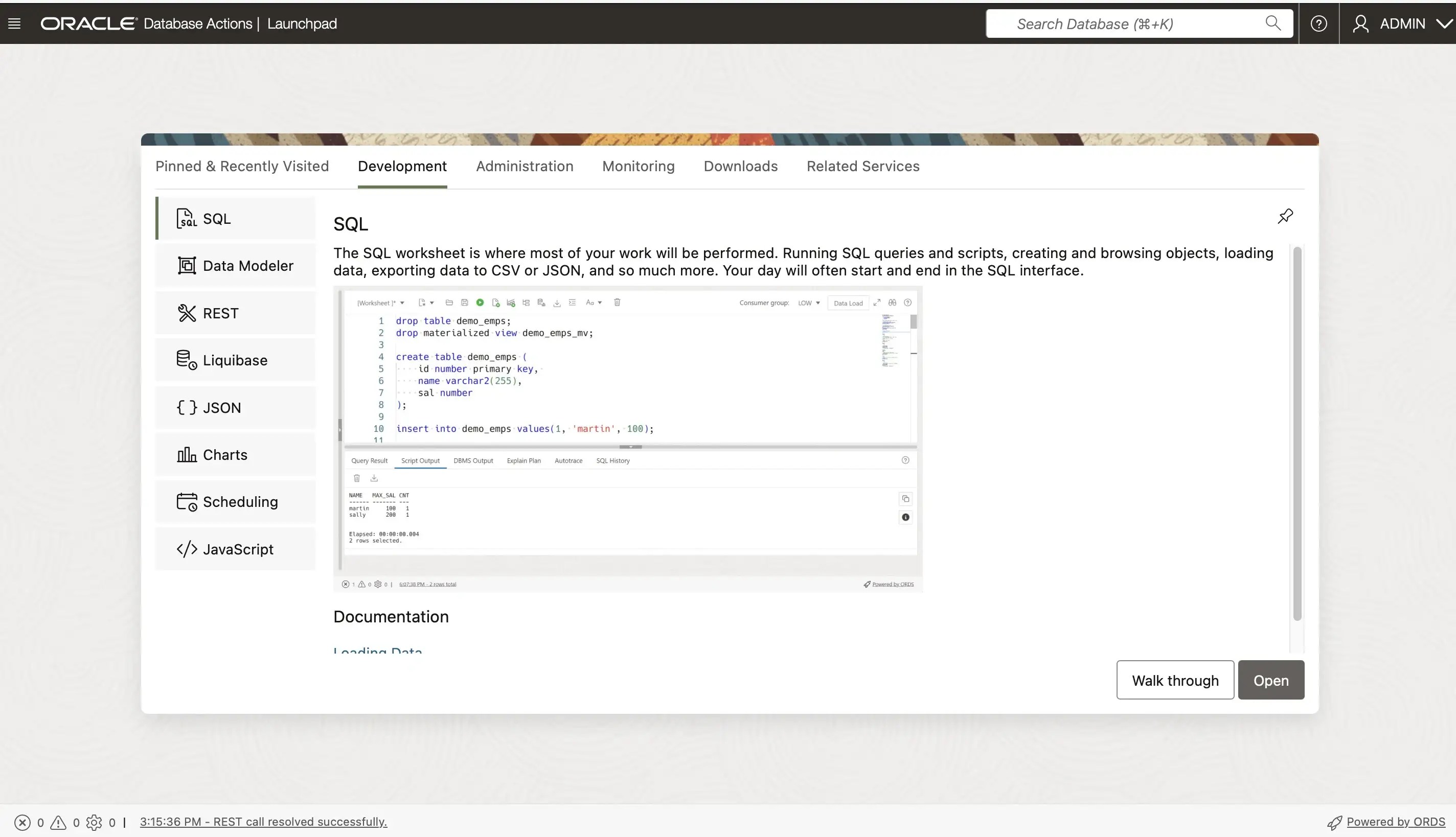
Here we have the Database Actions web page with its well-known hamburger menu.
Connect Autonomous Database with SQLcI
Now I will connect to the database using SQLcl. Since I’m using mTLS (mutual TLS) over TCPS with SSL_SERVER_DN_MATCH=TRUE for database access (all via port 1522), I need to copy the tls_wallet to my host machine.
osmandinc@192 sqlcl % docker cp adb-free:/u01/app/oracle/wallets/tls_wallet /Users/osmandinc/tls_walletosmandinc@192 sqlcl % export TNS_ADMIN=/Users/osmandinc/tls_wallet
For my Autonomous Transaction Processing (ATP) instance, I have the following mTLS connection options:
- myatp_medium
- myatp_high
- myatp_low
- myatp_tp
- myatp_tpurgent
osmandinc@192 sqlcl % sql ADMIN/Welcome123456@myatp_highSQLcl: Release 24.3 Production on Mon Jun 16 18:46:57 2025Copyright (c) 1982, 2025, Oracle. All rights reserved.Last Successful login time: Mon Jun 16 2025 18:46:59 +03:00Connected to:Oracle Database 23ai Enterprise Edition Release 23.0.0.0.0 - for Oracle Cloud and Engineered SystemsVersion 23.8.0.25.05
As shown in the banner, we have Oracle Cloud and Engineered Systems version 23.8.0.25.05 running in our local environment and it looks great.
Create sample_schemas
First I will download sample schemas from github repo.
osmandinc@192 Downloads % curl -sSL https://github.com/oracle-samples/db-sample-schemas/archive/refs/tags/v23.3.tar.gz | tar xzf -
Now I will create the HR sample schema using hr_install.sql through SQLcl. The script will prompt three times:
First, it will ask for the HR schema password. The password must be between 12 and 30 characters long and include at least one uppercase letter, one lowercase letter, and one numeric character.
Second, it will prompt for the default tablespace. The default is DATA for Autonomous Databases, which cannot be changed, just press Enter to accept it.
Third, it will ask whether to overwrite existing objects. Again, press Enter to continue with the default.
osmandinc@192 Downloads % cd db-sample-schemas-23.3\human_resources\osmandinc@192 Downloads % export TNS_ADMIN=/Users/osmandinc/tls_walletosmandinc@192 human_resources % /Users/osmandinc/Downloads/sqlcl/bin/sql ADMIN/Welcome123456@myatp_high @hr_install.sqlSQLcl: Release 24.3 Production on Mon Jun 16 22:20:57 2025Copyright (c) 1982, 2025, Oracle. All rights reserved.Last Successful login time: Mon Jun 16 2025 22:20:59 +03:00Connected to:Oracle Database 23ai Enterprise Edition Release 23.0.0.0.0 - for Oracle Cloud and Engineered SystemsVersion 23.8.0.25.05Thank you for installing the Oracle Human Resources Sample Schema.This installation script will automatically exit your database sessionat the end of the installation or if any error is encountered.The entire installation will be logged into the 'hr_install.log' log file.Enter a password for the user HR: *************Enter a tablespace for HR [DATA]:Do you want to overwrite the schema, if it already exists? [YES|no]:...Installationverification___________________________Verification:Table provided actual______________ ___________ _________regions 5 5countries 25 25departments 27 27locations 23 23employees 107 107jobs 19 19job_history 10 10Thankyou!___________________________________________________________The installation of the sample schema is now finished.Please check the installation verification output above.You will now be disconnected from the database.Thank you for using Oracle Database!
Now we have the HR sample schema loaded on our Autonomous Database 23ai instance running locally. This provides a great opportunity for testing and learning purposes.
Hope it helps.


Leave your comment